

The deployment pipeline basically defines the operations that shall be performed to properly deploy every service defined within your environment.Documentation Index
Fetch the complete documentation index at: https://qovery-fix-azure-rg-scoped-permissions-docs.mintlify.app/llms.txt
Use this file to discover all available pages before exploring further.
Overview
The deployment pipeline is composed of Deployment Stages. Each service within your environment belongs to exactly one deployment stage. Deployment stages are ordered by execution priority - a stage with a lower order is executed before a stage with a higher order. This allows you to control the deployment sequence and manage dependencies between services.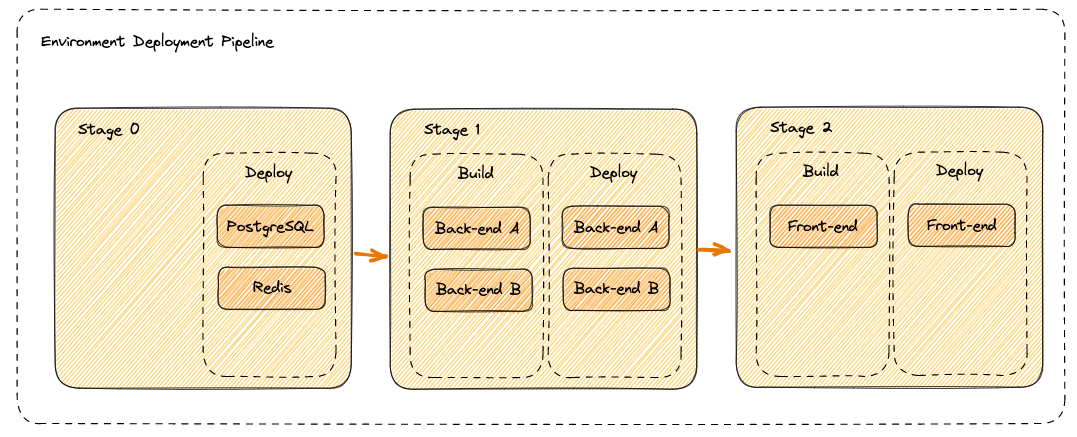
Pipeline Execution
Build Phase
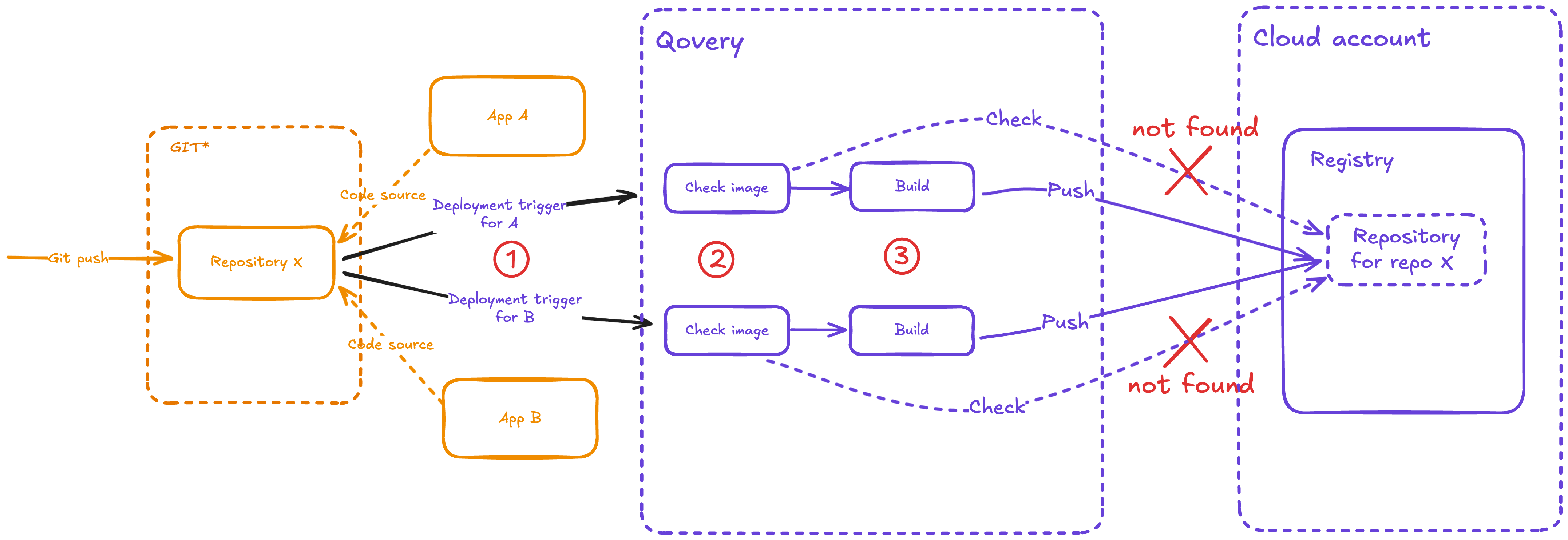
During the build phase:- Qovery CI downloads the repositories and generates container images
- Maximum parallelism: 7 builds can run simultaneously
- Build resources: Each build uses 4 CPU and 4 GB memory by default
- Image storage: Built images are pushed to the mirroring registry
- Pre-built images: Applications deployed from external CI/CD can bypass this step by using pre-built images from container registries
Deployment Phase
During the deployment phase:- Qovery engine manages deployment via Helm charts
- Maximum parallelism: 7 deployments can run simultaneously
- Image retrieval: Images are pulled from the mirroring registry
- Chart generation: Custom Helm charts are generated unless you provide your own
Default Pipeline Structure
When you create a new environment, Qovery automatically creates four default deployment stages: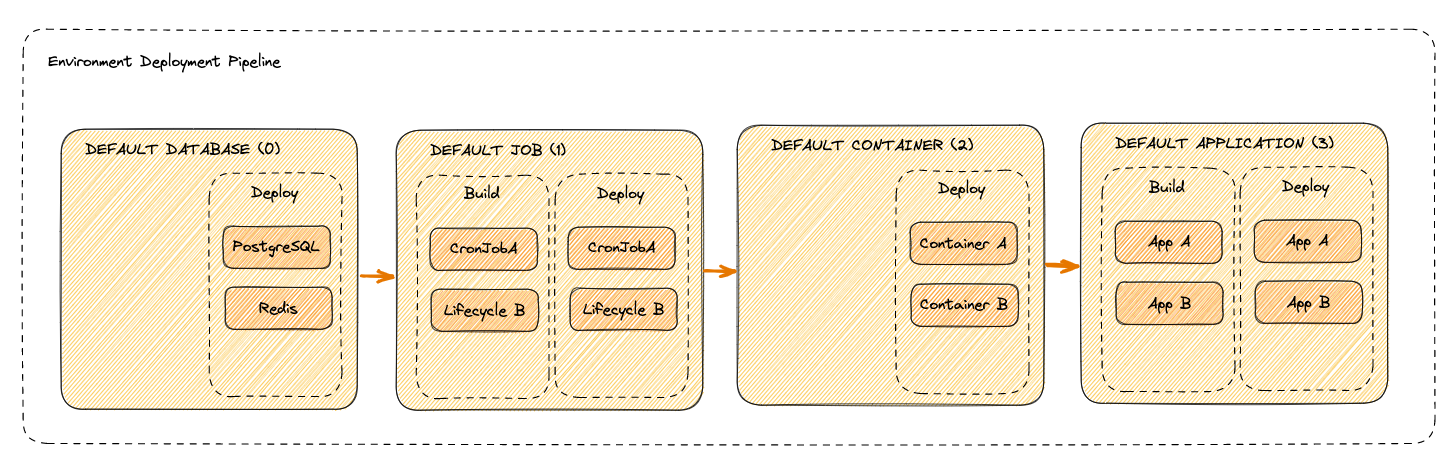
You can modify these stages or create custom stages through your environment configuration.
Performance Optimization
To optimize your deployment pipeline performance, consider the following strategies:Dockerfile Optimization
Review and optimize your Dockerfile structure following Docker best practices:- Use specific base image tags instead of
latest - Order Dockerfile commands from least to most frequently changed
- Leverage Docker layer caching
- Use multi-stage builds to reduce image size
- Copy dependency files separately to cache installations
Maximize Parallelism
When services have no dependencies between them, place them in the same deployment stage to deploy them in parallel. This can significantly reduce overall deployment time.Multi-Stage Build Caching
If you have multiple applications that share the same base image or dependencies, deploy dependent applications to later stages. This allows Qovery to reuse already-built images and cache layers.Avoid Environment-Specific Docker ARGs
Don’t use environment-specific Docker ARG values in your Dockerfiles. This causes Qovery to rebuild images for each environment even when the code hasn’t changed. Instead, use environment variables that are injected at runtime.Skipped Services
You can exclude specific services from environment-level deployment actions by marking them as skipped in the deployment pipeline settings.How to Skip a Service
In your environment’s Settings > Deployment Pipeline, drag a service into the Skipped column. Skipped services appear visually separated from the regular deployment stages.Behavior
- Environment deployment actions (deploy, stop, restart): Skipped services are excluded from the operation. They will not be built, deployed, stopped, or restarted when you trigger an environment-level action.
- Environment delete: Skipped services are still deleted along with the rest of the environment. The skipped status does not prevent deletion.
- Service-level actions: You can still deploy, stop, or restart a skipped service individually by triggering the action directly on that service.
- Clone and Preview Environments: When you clone an environment or create a preview environment, the skipped status is inherited by the cloned services. Services that were skipped in the source environment will also be skipped in the new environment.
Use Cases
- Temporarily disable a service without removing it from the environment
- Speed up deployments by excluding services that don’t need frequent updates
- Reduce costs by preventing unnecessary builds and deployments for stable services
Managing Deployment Stages
You can customize your deployment pipeline by creating, modifying, or removing deployment stages from your environment configuration section.Next Steps
Deployment Actions
Learn how to control deployments
Deployment Logs
Monitor your deployments with logs
Deployment Strategies
Configure deployment strategies
Image Mirroring
Optimize deployments with image mirroring